INTRODUCING / WHATSAPP COMMERCE
A better way to shop.
Starts with a conversation.
Your Shopify store. Your customers’ WhatsApp.
One assistant to bring them together.

PRODUCT DEMO
Meet NanoBot. See what it can do.
A quick look at NanoBot, your WhatsApp shopping assistant for Shopify stores.
SHOPPING JOURNEY
From question.
To checkout.
Follow a customer as NanoBot helps them find the right product, add it to their cart, and continue to Shopify checkout.
Explore the five steps01 / THE CUSTOMER JOURNEY
From conversation to checkout.
One conversation. From start to finish.
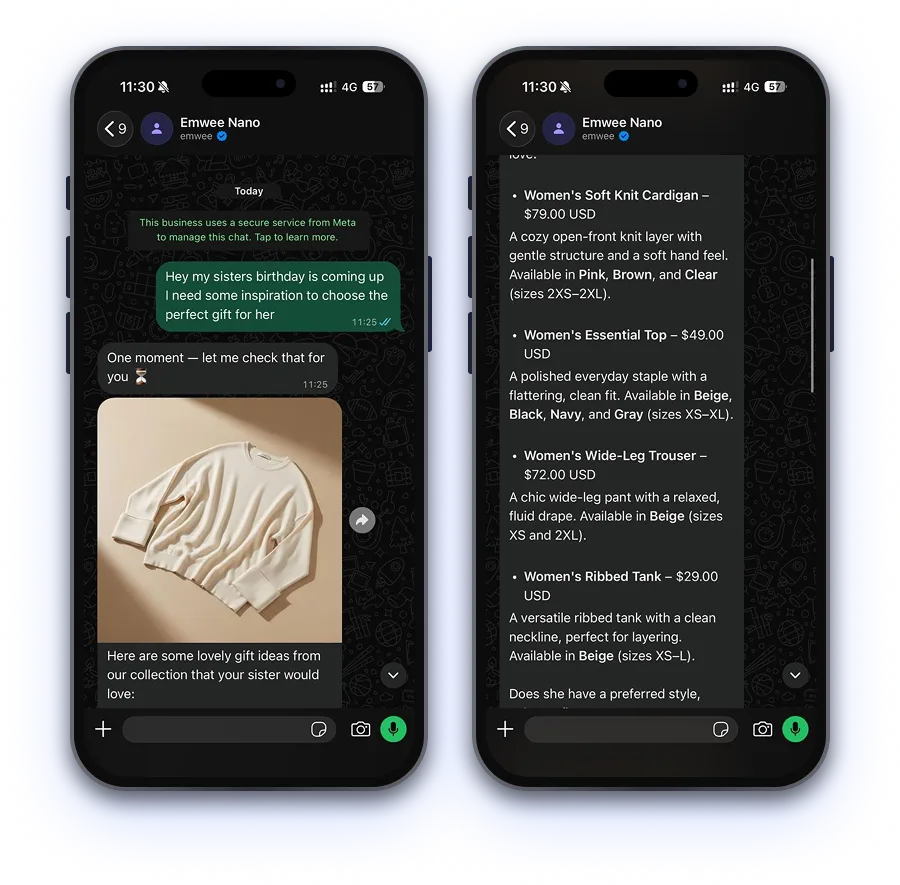
It starts with a question.
Shop by asking, just like messaging a friend.
A shopper shares who they are shopping for and what they need. Nano replies in WhatsApp and starts looking through the store’s catalog.
02 / BUILT AROUND YOUR STORE
Everything a helpful assistant needs.
Already part of the conversation.


03 / GOOD TO KNOW
A few questions.
Before we say hello.
01What do I need to get started?
A Shopify store and a WhatsApp Business setup using the Meta Cloud API. We’ll review your catalog, store policies, and messaging setup together before planning the integration.
02Can shoppers send voice notes?
Yes. Voice notes are supported when voice handling is enabled with the Gemini provider. For other configurations, the agent guides shoppers to continue by text.
03Where do product answers come from?
The agent uses Shopify tools to look up products, variants, prices, availability, and store policies. Its instructions require it to use returned store data and say when an item is unavailable.
04Does checkout happen inside WhatsApp?
The conversation and cart updates happen in WhatsApp. A checkout button opens the store’s Shopify checkout, where the shopper completes payment.
05How is NanoBot set up for my brand?
We work with you on store connectivity, the agent’s tone, and the shopping flows you want to support. Request a demo to discuss your catalog and the right configuration for your business.
NEXT / LET’S START A CONVERSATION
Your next sale
starts with “hello”.
Bring NanoBot to your store.
We’ll help you make the introduction.